


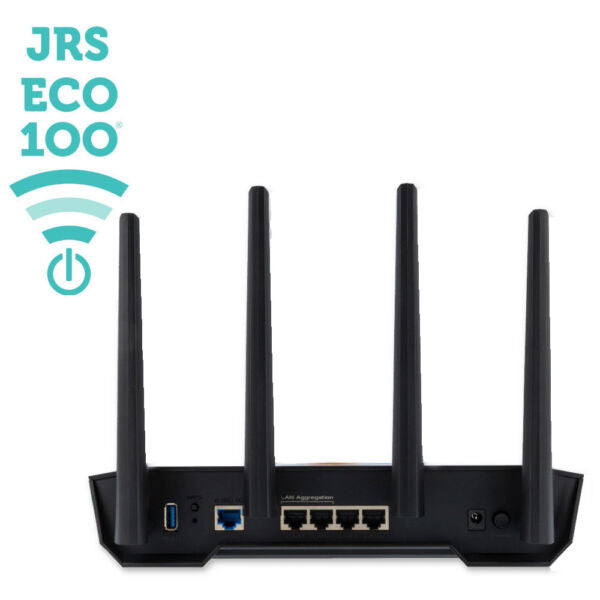
Description
Features
How to Use
About JRS
Shipping & Returns
Up to 87% fewer WiFi pulses — and no wireless emission at all when nothing is connected.
In most homes, the WiFi router is the biggest 24-hour EMF source in the building. An ordinary router broadcasts beacon signals — the network's name — 10 times a second, every second, whether anyone is online or not. It does that at a factory transmit power of around 100 milliwatts, and most models either will not let you turn it down, or only in coarse jumps.
The JRS Eco 100 Era is a current Asus® router running JRS® Eco firmware. It changes two things: how often the router transmits, and how precisely you control how far it reaches.
What the meters show:
JRS measured the Era against an ordinary router using three instruments — a Safe and Sound Pro II RF meter, a Cornet ED98 QPro 5G meter, and a Rohde & Schwarz FSH6 spectrum analyzer. Different meters read WiFi frequencies differently, which is why all three are published.
| Setting | Safe and Sound Pro II (at 8 ft) |
Cornet ED98 QPro 5G (at 2 ft) |
Rohde & Schwarz FSH6 channel power (at 2 ft) |
|---|---|---|---|
| Ordinary router, 100 mW factory default | 31,300 µW/m² | — | — |
| JRS Eco 100 Era at 100 mW (large range) | 9,220 µW/m² | 7,110 µW/m² | −18.6 dBm |
| JRS Eco 100 Era at 10 mW (medium range) | 1,320 µW/m² | 1,076 µW/m² | −26.7 dBm |
| JRS Eco 100 Era at 1 mW (minimum range) | 280 µW/m² | 290 µW/m² | −33.4 dBm |
| No device requesting WiFi | Zero | Zero | Zero |
There are two ways to read that table. At matched transmit power — the Era at 100 mW against an ordinary router at 100 mW — the measured field is up to 71% lower, and that difference comes from the firmware cutting the pulse rate rather than from turning the power down. Set the Era to its 1 mW minimum and it measures 280 µW/m², up to 99% below the ordinary router, which JRS reports as the lowest figure of any WiFi router on the market.
Range is a dial, not a compromise you are stuck with:
Transmit power and range are physically linked, and no firmware changes that. What the Era gives you is precision: 20 steps in 1 dB increments, from 1 to 100 milliwatts, set with a slider. You cover the area you actually use and no more.
It ships at 20 milliwatts, which JRS considers adequate range for a medium-sized home. (Earlier units shipped at 63 milliwatts.) In the US a higher 2.4 GHz ceiling is legal — up to 800 milliwatts — and JRS specifically recommends against using it because of the EMF levels involved.
Speed does not change with the power setting. You get full AX4200 WiFi and the 2.5 Gbps internet port at every range.
Full Eco standby — no signal when nothing needs one:
When no wireless device is requesting WiFi, the Era stops transmitting altogether: a fully radiation-free state that ordinary routers never enter. Re-enable WiFi on your phone and the signal returns immediately.
Worth knowing: a device that stays associated to the network keeps the link alive. To reach the zero state overnight, turn WiFi off on your devices or use the built-in scheduler. There is also a physical WiFi on/off button.
New — Eco 100 Extender mode:
Plug-in WiFi extenders are the quiet problem in a low-EMF home. They emit as much as a full router — 10 beacon pulses a second, 24 hours a day — they stay in constant contact with the main router, and they are usually installed upstairs near a bedroom.
With firmware 2.11 or later, a second Era (or an Eos) can run as an Eco 100 Extender instead: what JRS calls a world first, a WiFi repeater that emits radically less radiation. Up to 87% fewer beacon pulses while in use, and nothing at all when no device is requesting WiFi.
Paired with an Era as your main router, the whole chain stands down in sequence. Turn WiFi off on your phone, the extender's WiFi switches off, and then the main router's does too. The entire system goes radiation-free.
This arrives as a free firmware update for current Era and Eos units. It replaces JRS's previous advice for dead spots, which was to run an Ethernet cable and install a second full router at the far end.
Features:
- Up to 87% fewer beacon pulses than an ordinary router (about 1 per second, versus 10).
- Full Eco standby: no wireless emission when no device is requesting WiFi.
- Up to 99% lower measured EMF at the minimum range setting (280 versus 31,300 µW/m², Safe and Sound Pro II at 8 ft).
- Up to 71% lower measured EMF at matched 100 mW transmit power — from the firmware, not the dial.
- Precise range control: 20 steps, 1 dB increments, 1–100 mW.
- Ships at 20 mW — adequate range for a medium-sized home.
- Eco 100 Extender mode (firmware 2.11+): run a second unit as a low-radiation WiFi repeater.
- WiFi on/off button and built-in scheduler.
Specifications:
- AX4200 WiFi speed and 2.5 Gbps internet port, for ultra-fast connections.
- Transmit power 1–100 mW in 20 steps of 1 dB; ships at 20 mW.
- Seamless installation and device connection: scan the code on the bottom of the router to connect your devices with a single click, ensuring they can wake the Eco router from sleep mode.
- Convenient Eco Settings menu: access all Eco 100 functionality at a glance.
- Precision WiFi range control: adjust the signal range with a convenient slider.
- Indication LEDs: easily see when Eco mode is active.
- 4x Gigabit Ethernet LAN ports, for fast and reliable hardwired connections.
- USB 3 port, for sharing files or using a USB printer server.
- VPN capability, for a secured connection and for privacy.
- WPA3 encryption, for a secure WiFi connection.
- Ready to go: comes with JRS Eco 100 firmware installed.
- 2-year warranty.
How to set it up:
- Plug the JRS Eco 100 Era into your existing modem or provider router with the included LAN cable.
- Scan the QR code on the underside of the router to connect your devices — this also lets them wake the router from Eco standby.
- Open the Eco Settings menu to see all Eco 100 functions in one place.
- Set the transmit power with the range slider: start at the shipped 20 mW and step down until coverage is just enough.
- Confirm your setting with an EMF meter at your usual seating or sleeping distance.
- Program the scheduler to switch WiFi off overnight.
- Turn WiFi off on your devices when you are done — Full Eco standby then stops the router's wireless emission entirely.
- Optional: add a second Era in Eco 100 Extender mode to cover a far room without a constantly broadcasting repeater.
Compatibility:
The Eco 100 Era connects to your existing modem or provider router with the included LAN cable — no change of internet service required. JRS confirms compatibility with all major providers, including Xfinity, Verizon, AT&T, and Spectrum. The router comes with a universal power adapter, compatible with US and worldwide voltages and frequencies.
This JRS Eco product is shipped by JRS Eco from the Netherlands
ALL DUTIES AND SHIPPING TO USA ARE PREPAID AND INCLUDED IN PURCHASE PRICE
Measurement figures above are JRS Eco Wireless lab measurements taken with the stated instruments at the stated distances. Real-world readings vary with layout, distance, and meter.
